Regular readers of this blog will know that I'm not averse to trying new IDEs for my rails development.
I recently came across this post by George Cook about an app I hadn't considered.... NetBeans.
George does a great job of explaining NetBeans's virtues, so I won't repeat them all here, but to sum up, it does everything I need a rails IDE to do plus a little bit extra. The most impressive feature for me is the in-IDE fast debugging (more on how to set this up below).
NetBeans does have it's down points. With its default settings it doesn't look as slick as TextMate, but after some fiddling around with the preferences you can rectify this. It does use more memory than TextMate but even on my MacBook with 1GB RAM and lots of other applications open, I still have a little bit free. Besides, compared with something like Microsoft Visual Studio 2005 (which eats RAM for breakfast) NetBeans is a veritable size zero.
There is a ruby-only build of NetBeans available which helps to keep the memory footprint down. The exact version I installed was build 3533, which seems to work fine.
UPDATE (26 Sep 07): Netbeans 6 Beta 1 is now out! Get it from the Sun web-site.
Getting started with NetBeans
Here are few quick pointers to get you going.
To begin, all you have to do is do:
-> File -> New Project
.. and then choose "Ruby on Rails Application with Existing Sources"
and browse for your rails folder.
You need the ruby-debug-ide gem installed (sudo gem install ruby-
debug-ide) to do fast debugging.
Before trying to debug, you need to go to:
-> Preferences -> Ruby -> Platform
... then choose the location of your ruby interpreter (e.g. /usr/local/bin/ruby)
You should then be able to select the Fast Debugger radio button for the
Debugger engine. (If you can't, try restarting NetBeans - this worked for me).
Monday, 10 September 2007
NetBeans Intervenes


Please also visit the Swirrl blog

Monday, 7 May 2007
Aptana with fast debugging
I blogged a while back that Radrails was taken over by Aptana. Recently, someone entered a comment on this old post saying that Aptana now supports fast debugging. So I thought I'd give it a whirl.
To get it to work, you need to install the "ruby-debug" gem, the "ruby-debug-ide" gem, and follow these instructions.
This is a very useful feature, although having used TextMate for a while I prefer its clean look over Aptana's rather cluttered feel.
Please also visit the Swirrl blog
Sunday, 4 March 2007
TextMate for rails
With the seemingly indefinite postponement of Radrails 0.8, I decided to go on the hunt for another Ruby on Rails IDE.
After scouring the web, I found that many people seem to favour TextMate, and according to this page the core Rails team use it for development, so I thought I'd give it a whirl.
I must say I am impressed. It features Subversion integration, and some built in support for developing Ruby on Rails applications. The only thing it doesn't have is a step-through ruby debugger, but there is a TextMate ruby-debug bundle which allows you to set breakpoints from within TextMate. (My previous blog post explains more about ruby-debug.)
Note that in order to get the Subversion integration to work, you need a Subversion client installed. There are now new instructions on Hivelogic.com for setting up rails on OS X which now feature how to install one.
TextMate is not free, but it is cheap at only 39 Euros.
Please also visit the Swirrl blog
Fast Ruby debugging
Last September I described how to use Radrails for debugging rails apps. I mentioned in that post that it was slow and unresponsive, but bearable.
Today I discovered another way of debugging Ruby On Rails apps, but this time in a much speedier fashion.
Ruby-debug allows you to quickly debug your ruby on rails code. The debugger itself is not integrated into an IDE, but the command line interface is intuitive and adequate.
There is an excellent tutorial on the DataNoise website for how to use ruby-debug. Using this, I was able to get debugging literally within a few minutes.
Please also visit the Swirrl blog
Wednesday, 20 September 2006
Update on debugging in RadRails
In my last post I described how to get Rails debugging to work in RadRails. I've had some reaction to my instructions, and on the whole they seem OK.
However, I don't think I made it clear that you need to set the breakpoints before you start the server.
Also, someone said they couldn't get it to work with older versions of Ruby and RadRails - so make sure you're fully up to date!
Any more feedback appreciated.
Please also visit the Swirrl blog
Tuesday, 19 September 2006
RadRails, all is forgiven!
UPDATE 9 March 2007: If you're using a Mac, you might want to try TextMate with ruby-debug. See these more recent posts:
Fast Ruby Debugging
TextMate for Rails
UPDATE 7 May 2007: Aptana (formerly Radrails) now supports fast debugging. See this recent post: Aptana with fast debugging
UPDATE 12 Sep 2007: NetBeans is another debugging solution I've recently discovered (and one I'd heartily recommend trying).
In August, I made a couple of posts (RoR debugging, Gleaming Steel) regarding Ruby on Rails IDEs and debugging. Since then I've come across something which made me realise I hadn't been giving Radrails its due praise.
While browsing the RadRails community pages for news of any updates, I found a link to this article by Steve Midgley which explains how to set up Eclipse for inline debugging with Rails. Steve was using something called EasyEclipse, but RadRails is based on Eclipse so I gave his instructions a go, and hey-presto!... rails debugging.
It's a bit slow, but no slower than RubyInSteel or Komodo. I think the RadRails team should make more of an effort to publicise their app's ability to debug rails code, as other products make a big deal of this feature. (apparently "fast debugging" is coming in version 0.8 of RadRails).
Steve's instructions, although very informative, are quite "wordy" and somewhat oriented towards EasyEclipse - so I thought I would write my own instructions specifically for RadRails with some screenshots. (click on the screenshots to zoom in).
(I'm using RadRails 0.7.1 with Ruby 1.8.5 and Rails 1.1.6 on Windows XP SP2.). I've also got debugging going in Mac OS X see this post.
1. First, get your installation of RadRails set up properly (here are some good instructions for this).
2. Set a breakpoint somewhere (such as a controller method) by double clicking in the margin.
2. Open your rails project, and have the Rails Navigator View open. Go to the Run menu and choose 'Debug...'
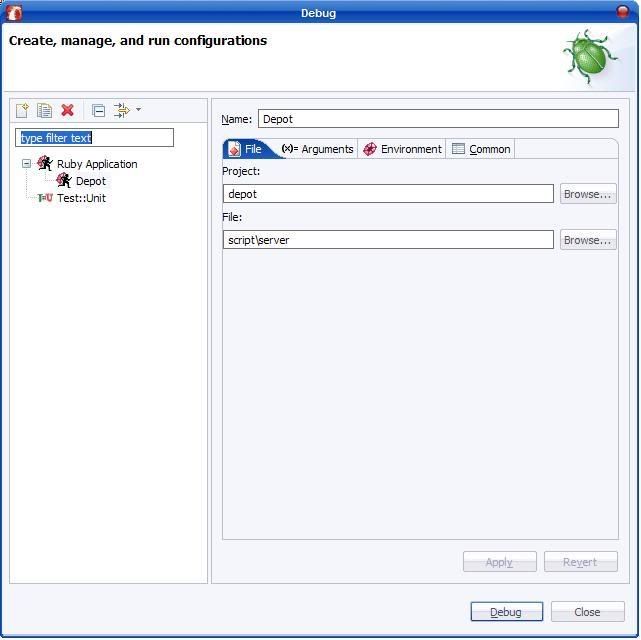
3. You will be presented with the Debug dialog. Make a new configuration for your project and on the File tab, specify the file as script/server.
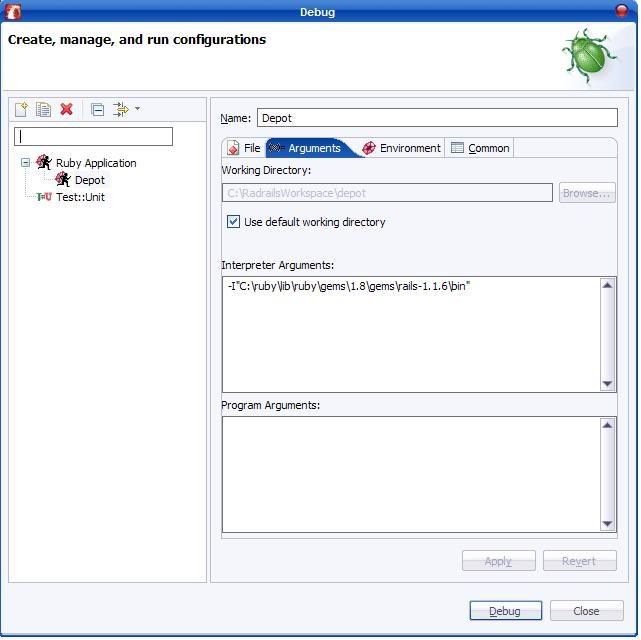
4. On the Arguments tab, enter -I"[path_to_rails]", like in the example below. (There is no space between the -I and the path). You can also specify program arguments too if you like, such as which port to start on (not shown below).
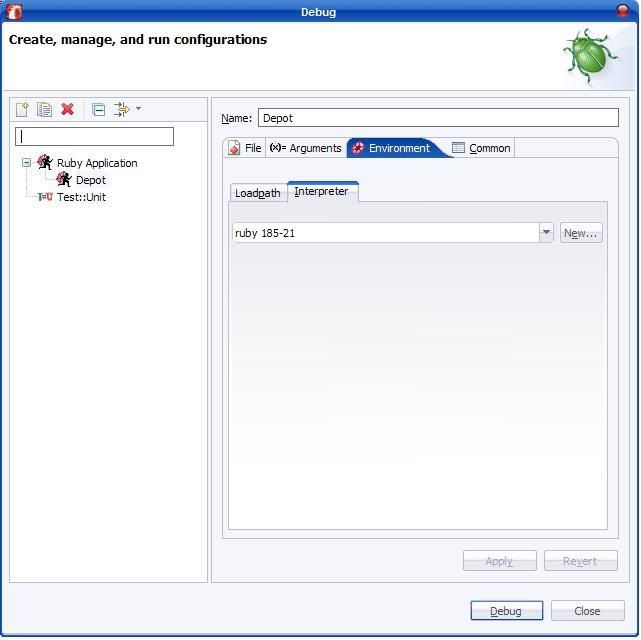
5. On the Environment tab, select your ruby interpreter.
6. On the Common tab, ensure that the "Allocate Console" checkbox is checked, and the "Launch In background" checkbox is unchecked.
7. Click Apply to apply all your changes. Clicking "Debug" should start the debugger. After a short wait, You should see something like the screenshot below in your RadRails Console window. If not, review the steps above as you've gone wrong somewhere.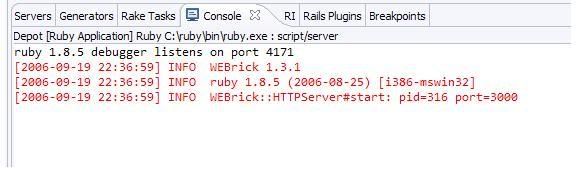
9. (This step was updated 20th Nov 2006) Go to the Debug Perspective (Window -> Open perspective... ). You should see execution stopped at your breakpoint. You are now able to step in/out/over. You can inspect variables by highlighting a variable currently in scope, right clicking and choosing inspect. The variable will appear in the Expressions window (I think this shows in the top-right of the Debug Perspective by default).
To debug again later, you can simply go to Run -> Debug History, and choose the name of the debug configuration you set up earlier.
All of this is essentially the same idea as setting up debugging in RubyInSteel or Komodo, so I knew it must be possible somehow, I just couldn't figure out the configuration options - my thanks go out to Steve Midgley!



Please also visit the Swirrl blog
Tuesday, 22 August 2006
Gleaming steel
UPDATE (19 Sept 06): Radrails included debugging all along - check out my latest blog entry.
Last week I posted an entry about RoR IDEs and debugging. Since that was written, I have tried out the latest version (0.75) of the free RubyInSteel plug-in for Microsoft Visual Studio from the chaps at SapphireSteel software.
Using the simple articles in their website's online user guide, I successfully managed to import my rails project, and debug rails server methods. (For the record, I am using VS2005 Professional).
Running the server in debug mode was considerably slower than running it normally, taking 3-4 seconds to load each page, but it was much quicker than running Komodo's debugger. My only complaint is that my rails server seemed to randomly stop a couple of times while debugging.
I also managed to successfully install and use the VisualSvn SVN plug-in for Visual Studio. This is not free but cheap at $19, and I found it much better than ankh, which I had previously tried.
To use VisualSvn, you also need to install the Tortoise SVN client, which is available from the VisualSvn download page. Everything was a dream to set up and use - All I did was install everything and it just worked. (It seems to just go off the .svn folders in the directory structure, as I assume all svn clients do. These folders were already there for me, after using RadRails).
Visual Studio 2005 itself has its down-points, such as being RAM-hungry and a little bit buggy in places, but its a mature, effective editor with lots of good features. I also had almost zero learning curve to overcome before starting to edit my RoR code, with me already being very familiar with this IDE.
I think I will use the VS2005-RubyInSteel-VisualSVN combo as my main environment for a while - at least until RadRails includes rails debugging.
Stay tuned to find out if I still feel the same love after using it in anger for a bit!
Please also visit the Swirrl blog
Wednesday, 16 August 2006
Ruby on Rails IDEs and debugging
UPDATE: You might want to have a look at this post for details of using TextMate for Ruby On Rails development, or this post for NetBeans.
I'm primarily a .NET developer in my job but in my spare time I've recently been dabbling in a bit of Ruby on Rails (RoR) development. If you've never heard of it, check out www.rubyonrails.org - Its basically a new-ish web development framework based on the ruby scripting language.
To develop in RoR you don't need an IDE - you can get by with notepad and a console window but I've grown up on Microsoft Visual Studio so I felt the need for one.
So far, I've mainly been using RadRails, which is a pretty neat, free, open-source Ruby On Rails IDE based on Eclipse. This does most things I've needed, such as integrated Subversion source control support, syntax highlighting and various other Rails specific bits and bobs such as starting/stopping the Rails server etc (LightTPD, Mongrel and WEBrick Servers are supported).
However, at the time of writing RadRails is still missing rails debugging capabilities. Rails does come with a console "breakpointer" tool which lets you interrogate variables at certain points in the code, but there's no way of stepping-through rails server code (specifically the "controller" classes), while making requests from a browser, like Visual Studio does for ASP.NET. Apparently debugging will be included in Radrails 0.8, but 0.7 has only just been released and as a relative rails novice I've felt the need for a debugger quite frequently recently.
UPDATE (19 Sept 06): Radrails included debugging all along - check out my latest blog entry.
So, over the last few weeks I've been on a quest to find a decent RoR IDE with debugging, but with which I don't lose anything I've become accustomed to with RadRails, and which doesn't break the bank. This has proved not to be an easy task.
RubyInSteel is a free plug in for Visual Studio, which promised debugging, but after installing it I found that although it can debug ruby script, there is no support for rails debugging. Besides, the only SVN plug in I found for Visual Studio was ankh, which I couldn't get to work very well with my remote SVN repository.
(UPDATE: Since this was originally written, I've tried out the new version of RubyInSteel which does support rails debugging - see my next blog entry).
Arachno is a commercial standalone IDE which supports ruby on rails. This too claims to support rails debugging, and I found instructions in the ruby on rails wiki which detail how to set it up. I followed these instructions to the letter on my trial version of arachno, but to no avail. Maybe it was just lack of familiarity with this app, but I couldn't figure out why debugging wasn't working. The general feel of this IDE is a bit clunky and although it seems like there are lots of features, I wouldn't like to use it as an everyday editor. I never got as far as trying to get SVN to work with this one. Maybe if I can find out where I went wrong with the debugging, I'll give it a go, as arachno is pretty cheap at $49 for the personal version.
Komodo is another commercial standalone IDE supporting RoR, and I actually got this one to debug a controller method by following these very simple instructions. However, running your rails app in debug mode through komodo is very sluggish. For example, my rails server which normally fielded page requests almost instantaneously on my dev-PC sometimes took 30 or more seconds per page under debug mode in komodo.... but, when a breakpoint was actually hit, the IDE seemed to respond fairly well to clicking the step-over/in/out buttons. I also got SVN to integrate OK too, although I had to install a separate svn client - something which you don't need to do in RadRails - and accessing SVN functions caused the IDE to crash on me once. All in all, komodo is quite slick and if it wasn't for the weighty price tag of $295 for the professional edition (you don't get SVN support in the personal edition), I would be very tempted. The jury (me) is still out on this one.
So after all that I think that, in the short term, I'll have a bit more of a play with komodo during my free trial to see if it really justifies spending over 150 pounds. I might just sit it out and wait for RadRails 0.8, as it does everything else so well (and its free!).
Please also visit the Swirrl blog


